Computing Measurements for Vector Fields
You can compute measurements and add additional scalar data to vector fields in the Compute Measurements dialog.
Right-click the vector field to which you want to add scalar data and then choose Compute Measurements in the pop-up menu to open the Compute Measurements dialog, shown below.
Compute Measurements dialog
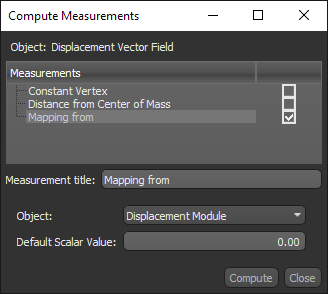
The following categories and items are available for vector fields.
| Description | |
|---|---|
| Constant Vertex | Adds a constant vertex value. You can enter a title for the measurement and choose the constant value. |
| Distance from Center of Mass | Adds distance measurements computed from the vector field's center of mass. |
| Mapping from | Lets you map the scalar values from another object, such as an image, multi-ROI, or scalar mesh. |
How to Compute a Measurement for a Vector Field
- Right-click the vector field to which you want to add scalar values and then choose Compute Measurements in the pop-up menu.
The Compute Measurements dialog appears.
- Select the measurements and other values that you want to add to the selected vector field, as well as any other requirement(s).
- Click Compute.
The computed measurements and other values are selectable in the Scalar information box (see Scalar Information).
